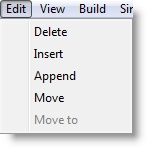
When creating or modifying records in an edit table such as a Locations or Entities table, the Edit menu appears as follows.
The following table briefly lists the function of each selection of the Table Edit menu.
Delete Deletes a record from the table.
Insert Inserts a record in the table above the current record.
Append Appends a record to the end of the table.
Move Marks a record for moving to a new position in the table. Only one record may be marked at a time.
Move to Moves the previously marked record in the table above the current record.
How to delete a record from a table:
How to insert a record in a table:
How to append a record to the end of a table:
How to move a record to a new position in a table:

|
© 2012 ProModel Corporation • 556 East Technology Avenue • Orem, UT 84097 • Support: 888-776-6633 • www.promodel.com |